Enchanted Forest Character Designer succeeds by focusing on what matters most in a dress-up game: meaningful choices. The two-part hairstyle system and detailed facial customization set it apart from simpler alternatives. Each accessory feels intentional, and the natural theme provides a cohesive aesthetic. The lack of time pressure encourages thorough exploration, and the browser-based format makes it easy to jump in for a few minutes. While it lacks multiplayer features or a sharing hub, the core experience is polished and satisfying for anyone who enjoys crafting unique characters.
Description
Character Creation Foundations
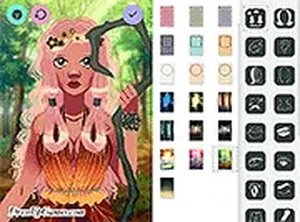
Enchanted Forest Character Designer places the player in the role of a stylist for mythical woodland beings. The core activity involves selecting a base character type from three distinct archetypes: a pointed-eared elf, a luminous forest spirit, or a sturdy human guardian. Each choice influences the available customization options, but the real depth comes from the layers of detail that follow. Players begin by choosing a background scene that sets the mood for their creation, then move through a series of menus dedicated to different aspects of appearance.
Hairstyle and Wing Customization
A standout feature is the two-part hairstyle system, where players can independently select the front and back sections of hair. This allows for combinations like a braided crown with flowing locks or a short crop with long side strands. Wing options range from delicate butterfly shapes to sweeping feathered forms, each available in multiple colors and patterns. The ear shape selector includes pointed, rounded, and leaf-like variations, adding to the fantasy feel. These elements work together to give each character a distinct silhouette.
Facial Details and Body Art
The face receives considerable attention through adjustable eye shapes, makeup intensity, and a reflective shine that can make eyes appear glossy or matte. Facial markings such as vines, stars, or geometric lines can be applied in various colors and positions. Skin tones cover a wide spectrum, including natural human shades and fantasy hues like pale blue or soft green. Body markings extend this personalization further, allowing for patterns that wrap around arms or legs, creating a cohesive look that matches the chosen background and outfit.
Accessories and Final Touches
Accessories form the finishing layer of the design process. Arm cuffs, belts, necklaces, and earrings are available in styles that echo the natural theme, with materials like wood, stone, and woven fibers. These items can be mixed freely, so a character might wear a leafy crown with a crystal pendant and leather wristbands. The interface supports both mouse and touch input, making it easy to tap through menus on a tablet or click on a desktop. A full-screen mode removes distractions for a more focused creative session.
Browser-Based Accessibility
No installation is required to play. The game runs entirely within a web browser, which means it works on Windows, macOS, Chrome OS, and iOS devices without any downloads. Progress is saved locally, so returning players can pick up where they left off. The free-to-play model means all customization options are available from the start, with no paywalls blocking specific hairstyles or accessories. This approach encourages experimentation, as players can try bold combinations without worrying about costs.
Creative Exploration Tips
To get the most out of the experience, try pairing contrasting textures like smooth wings with rough bark-like arm cuffs. Using complementary colors for the background and outfit helps the character stand out. Since there is no scoring or time limit, taking several passes through the menus can reveal combinations that were not obvious at first glance. Saving a screenshot of the final design allows for sharing with friends or keeping a personal gallery of favorite creations.
Compatibility
✅ Works on PC & Mobile | Recommended: Chrome / Safari / Edge
Faq
Can I save my character designs in Enchanted Forest Character Designer?
The game saves progress locally in your browser, so returning players can continue editing previous designs. To keep a permanent record, use your device's screenshot function. This method works on both desktop and mobile platforms, ensuring your creations are preserved even if browser data is cleared.
Is Enchanted Forest Character Designer suitable for children?
Yes, the game is designed for all ages. It contains no violent content, mature themes, or real-money transactions. The interface uses simple touch or click controls, making it accessible for younger players. Parents can feel comfortable allowing children to explore the creative options without supervision.
Does the game require an internet connection to play?
An active internet connection is needed initially to load the game from the browser. Once loaded, most customization features work without constant connectivity, though saving progress may require the page to remain open. For the best experience, a stable connection is recommended.
How many different character types can I create?
The game offers three base archetypes: elf, forest spirit, and human guardian. Each can be customized extensively with different hairstyles, wings, ear shapes, facial markings, and accessories. The combination possibilities are very high, allowing for hundreds of unique looks even within a single archetype.
Are there any in-app purchases or ads in this game?
Enchanted Forest Character Designer is completely free to play with no in-app purchases. All customization options are unlocked from the start. The game may display standard web advertisements, but these do not interrupt gameplay or restrict access to features.
Can I share my character designs with other players?
The game does not include a built-in sharing feature, but you can take a screenshot of your finished character and share it through social media, messaging apps, or email. This allows you to show off your creations to friends or online communities interested in character design.
Player Comments
💬
Sign in to comment
You must be logged in before posting a review or rating.

Player Comments
Sign in to comment
You must be logged in before posting a review or rating.
No account? Create one
No comments yet. Be the first to comment!