3D Pool Sports Challenge delivers a focused eight-ball experience with 3D graphics and a physics engine that handles collisions and spin. The AI opponent offers a fair challenge for solo players, while the family-friendly design keeps it accessible. Its main limitation is the lack of stated multiplayer options, but for quick browser sessions, it provides a solid billiards simulation.
Description
Classic Billiards with 3D Presentation
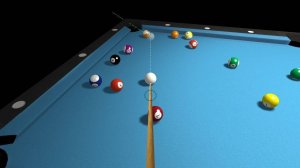
3D Pool Sports Challenge recreates the pool hall experience with three-dimensional graphics and a physics engine that governs how balls roll, collide, and react to spin. The core objective follows standard eight-ball rules: pocket every ball in your assigned group—either stripes or solids—then sink the black 8-ball before your opponent does. The game is designed for players of any skill level and runs directly in a browser.
Aiming, Power, and Spin Controls
Play begins with a break shot. You aim by positioning the on-screen cue, then drag it backward to set shot power. After the break, the table assigns you either stripes or solids. From there, each turn asks you to pocket your group balls legally. The controls also support applying spin, which changes how the cue ball travels after contact—useful for setting up the next shot or escaping awkward positions. Gentle drags produce soft placements; longer drags generate the force needed to scatter clustered balls.
Match Flow and the 8-Ball Rule
Once your group is cleared, the 8-ball becomes the target. Pocketing it early ends the game in an automatic loss, so shot selection near the end of a rack carries real risk. The AI opponent provides a fair but tough match for solo players, and the game rewards careful planning over rushed attempts. Because there are no mature themes, the experience stays suitable for all ages.
Approaching the Table Strategically
Positioning the cue ball for the next shot matters more than pocketing the current one. Two or three shots of foresight keeps control of the table. Spin helps control the cue ball's path after contact, and matching shot strength to the situation—soft for delicate placements, firm for breaking clusters—reduces unforced errors. Regular practice builds the accuracy and consistency needed against the AI.
❌ Not supported: Internet Explorer, older browser versions
Faq
What is the main goal in 3D Pool Sports Challenge?
You must pocket all balls in your assigned group—stripes or solids—and then sink the black 8-ball before the AI opponent does. Pocketing the 8-ball before clearing your group results in an automatic loss, so the order of shots matters throughout the match.
How do I control shot power and spin?
Aim with the on-screen cue, then drag it backward to set power—the farther you pull, the stronger the shot. Spin can also be applied to influence how the cue ball behaves after contact. Gentle drags work for soft placements, while longer drags generate force for breaking clusters.
Is 3D Pool Sports Challenge suitable for children?
Yes. The game is described as family-friendly with no mature themes, making it appropriate for players of all ages. It focuses purely on billiards mechanics and does not include content that would require parental guidance.
Can I play against another person?
The game features a challenging AI opponent for solo play. The provided information does not mention multiplayer or local two-player modes, so it is best suited to single-player matches against the computer.
Do I need to download anything to play?
No download is required. 3D Pool Sports Challenge runs directly in your browser, so you can start a match without installing additional software. This makes it convenient for short sessions or longer play when you have time.
What happens if I pocket the 8-ball too early?
Pocketing the 8-ball before you have cleared your assigned group causes an automatic loss. You must first pocket all your stripes or solids, then aim for the 8-ball. This rule adds risk to late-game shots and rewards careful planning.
Player Comments
💬
Sign in to comment
You must be logged in before posting a review or rating.








Editorial Notes